
Files and Directories
On this page
6.2 Files and Directories
6.2.1 Program Files and Runtime Root
Keep the official matching CDPS, COC, CREVIAUpdata, AuxTools, layout component, interface libraries, and device components together. Do not install a new station by copying one EXE or replace production files with Debug builds.
Locate the actual running program through its shortcut before maintenance; old copies can share similar names. Business data may live outside this root. Inventory references before backup rather than copying only installation files.
6.2.2 Business Files and External Resources
| Object | Backup/management requirement |
|---|---|
.skdCard |
Versioned design/configuration with recoverable prior releases. |
| File/server database | Engine-appropriate backup including personnel, relationships, and photo tables where applicable. |
| External photos/backgrounds | Inventory actual references; do not assume all are embedded. |
.repx |
Back up external files separately; embedded templates travel with their saved layout. |
LayoutDefinition.clcf |
Synchronization settings, not a complete printable layout or personnel database. |
| Exchange files | Work products, not inherently complete restoration sources. |
Binary photos depend on database backup, folder photos on files and naming, and interface photos on services and permissions. A saved preview image does not preserve those relationships.
6.2.3 Configuration and Personal Layouts
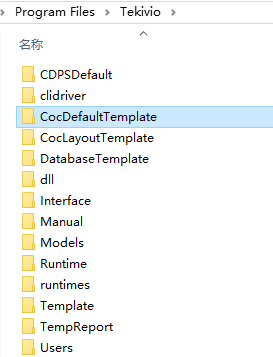
Paths below are relative to the runtime root. <user> means the actual application-generated directory; do not rename it speculatively.
| Location | Purpose |
|---|---|
DevXtar.win |
Encrypted CDPS users/groups/access. COC also uses policies inside layouts, so replacing this file does not update previously published layouts. |
CDPSDefault/LayoutDefinition.clcf |
Design-side synchronization settings associated with the release. |
CocDefaultTemplate |
COC default/sync entries and user settings; preserve the full structure. |
CocDefaultTemplate/<user>/CocSetup.win |
Encrypted grouping, card lookup, crop, and other saved settings. |
CocDefaultTemplate/<user>/CardImposition.Json |
User imposition parameters; recheck local paper/device after restoration. |
CocDefaultTemplate/<user>/AutoPrintConfig.json |
Automatic-print rules; prevent accidental output during restoration. |
CocLayoutTemplate/<user>/GVLayout.win, LVLayout.win |
Grid/card arrangements checked against user, layout, and view. |
Template |
Downloaded synchronized layouts; not a substitute for publishing-source backup. |
DatabaseTemplate |
Creation templates, not populated business databases. |
Older deployments may retain GroupSet.win. Current settings migrate old grouping; do not treat that old file as the only backup. Restore the actual version's full directories. For unmatched personal layouts, check user/layout first, not encrypted content.
6.2.4 License and Sensitive Files
Manage CREVIALicense.Key through normal licensing. It may bind machine, expiry, and features; copying it does not license another computer. Confirm migration/reissue requirements instead of editing it.
Layouts, synchronization, and permission settings can contain credentials, policies, and internal services even when encrypted. Use restricted backups and approved encrypted media, with organizational credential custody, access records, and retention. Do not upload the whole runtime folder to a public sharing site for support.
6.2.5 Project Inventory Example
This single-machine StaffCard example establishes names used below, not a mandatory installation path:
D:\CREVIAProjects\StaffCard\
|-- Layouts\StaffCard.skdCard
|-- Database\StaffCard.db
|-- Photos\
|-- Reports\StaffList.repx
+-- Exchange\
E:\CREVIABackup\StaffCard\2026-10-15_1800\
|-- Database\
|-- Layouts\
|-- Photos\
|-- Reports\
+-- RuntimeConfig\
The design administrator owns the layout/policies; the data administrator backs up/restores; operators verify records and physical cards. The SQLite example is not a shared-write design. Photo files such as DEMO0001.jpg follow the agreed binding. External reports are separate; embedded reports remain with the layout. This example uses no sync or external writes. Back up existing DevXtar.win, CDPSDefault, CocDefaultTemplate, and CocLayoutTemplate under RuntimeConfig. Re-select the local printer after recovery; driver names need not match another station.
The timestamp identifies one backup batch; create a new directory next time. E: must be independent storage, not merely another partition on the same disk. If unavailable, use another controlled independent/offline location. Store passwords, chip keys, and license contents separately in approved credential custody, not the inventory.
Before moving projects, inspect absolute paths, connections, and interface agreements. Update through CDPS, save/publish, and verify in COC; moving resources alone does not repair references.